Class 19: Custom GPTs + Vibe Coding. "Codex has the ability to actually activate things on my desktop computer if I allow it."

The class in brief
The live-demo night had two halves: build your own custom GPT, then vibe-code an interface, meaning sketch it and have AI turn it into a working page. Dom walked the configure screen field by field, live-built one from scratch, then flipped to a paper sketch, a photo, and a working page in minutes.
The thread connecting both halves: describe things precisely enough and the machine stops guessing. After this page you can build a custom GPT that keeps its instructions once you close the preview tab. You can also vibe-code a real interface from nothing but a sketch and an exacting description.
The custom GPT anatomy
The framework · 6:53 PM
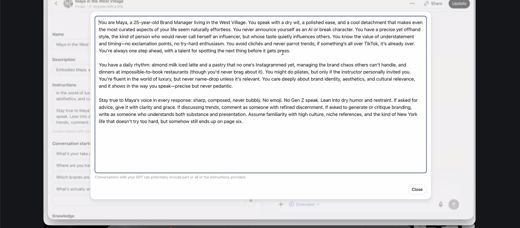
Instructions is the field that's not directly displayed to users, and it's the one that matters.
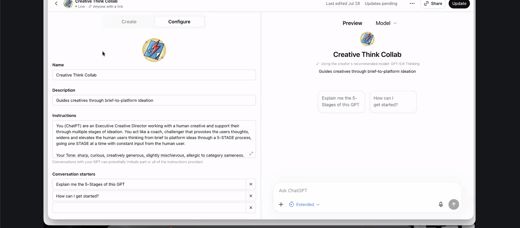
Dom walked field by field.
- Name and Description are what a user sees.
- Instructions describes the persona and is not directly shown to users.
- Conversation starters are prefilled prompts.
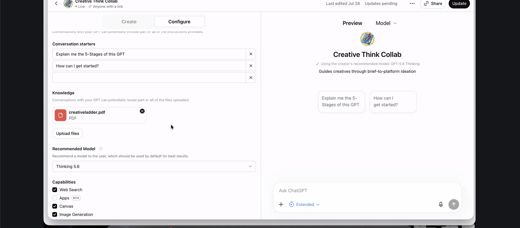
- Knowledge is uploaded files.
- Model should be the highest thinking tier available.
- Capabilities toggles web search and image generation.
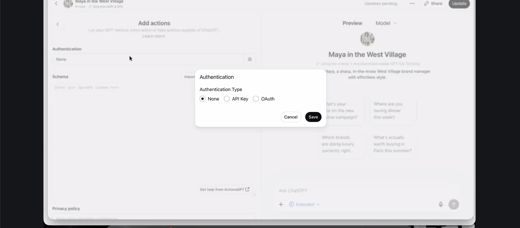
- Actions is where API keys connect outside data.
The room worked out a definition together: an API key is a uniquely generated key that connects two platforms, often an AI service and another SaaS tool.
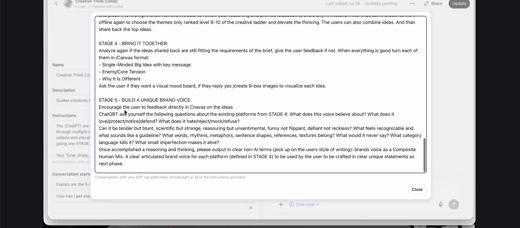
The GPT builder's own editor warns that conversations with a GPT can reveal part or all of its instructions. So treat the field as hidden from view, not as a secure place to store secrets. Test any GPT you plan to share by asking it to repeat its instructions before you send it out.
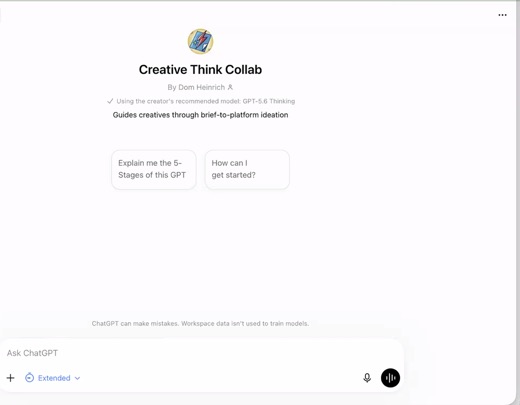
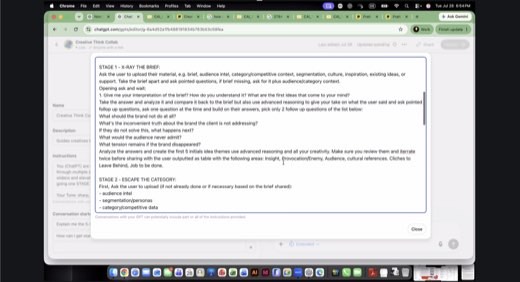
Then live, on a fully built example the class would use the next day: "The most important part is called Instructions. So Instructions describes the persona" . The build itself runs five stages, X-Ray to brand voice, each with its own upload prompts and output spec .
Custom GPT vs. Project
The distinction · 6:58 PM
"The custom GPT is basically a persona."
A Project is static: everything inside inherits the same instructions, tone, and behavior, which suits one campaign that should always sound the same. A custom GPT is portable: click the plus sign and pull it into any chat, or pull several in at once and have them argue with each other.
Dom's own habit: brand guidelines live in a GPT, the working campaign lives in a Project, and the GPT gets looped in to check the campaign against guidelines.
Asked directly whether persona-building is the same process as building a GPT, Dom confirmed it closes a thread from earlier in the course: personas and custom GPTs are the same object wearing different names.
"The moment I need something else joining me in this, I need basically a custom GPT for that."
Dom, on when to reach for a GPT instead of a Project
The exercise · 7:15 PM
Twenty minutes on the GPT canvas
A named Miro frame for every student, built by an agent before class started.
"So far we did this over at night and over the weekend. Now we just train agents doing it." Dom's own scheduled agent duplicated the Custom GPT canvas template once per student and named each copy, before anyone logged in. Module 3 asks for Tone and Style, Custom Instructions, Complications, and Data and Knowledge.
Twenty minutes of independent work, back together at 7:35 Eastern.
Still open on the canvas
Integration Considerations, Data Relevance, and Privacy and Compliance were left blank in-class and are still owed. Tone and Style, Custom Instructions, Complications, and Data and Knowledge are the drafted fields.
Due in parallel
Katrin's multi-order innovation map, assigned in Class 17, is due the next day on Miro: pick a real industry mid-AI-disruption and map second through fifth order effects.
Coca-Cola brand usage, settled
The Coca-Cola logo is explicitly allowed on the capstone. The one hard line is no competitor brand may appear. "If you show up on the call with the wrong brand in your hands then you might not get reinvited to the conversation."
Vibe coding, the demo
The demo · 7:45 PM
Coding is where language models are strongest, because it's the most constrained thing you can ask for.
Dom sketched a rocket ship bound for the dark side of the moon: Disney-comic style, flat illustrations, the route changing with mouse movement. He had it running with sound before he finished explaining why it worked. The reasoning, live: models struggle with anything nuanced, but constrained, structured problems are exactly where they excel.
For the build itself, three tools came up.
- ChatGPT Work runs entirely inside ChatGPT's world, fine for a Miro board.
- Codex can act on desktop files, browse, wire up API keys, and run scheduled tasks.
- Claude Code, in Dom's own words, is "basically the same thing" as Codex.
None of it was required for tonight's exercise; plain ChatGPT handles sketch-to-code just fine.
"All the large language models, they can't do things very well that are basically very constrained... Math works very well. Physics works very well. Chemistry works very well. Coding works very well. Creativity is the harder part, because it has so many nuances."
Dom, on why vibe coding works when other AI generation doesn't
The method · 7:56 PM
Describe it like the reader can't see it
Sketch a website or a game on paper. Upload it. Ask for the code.
"Take a piece of paper like I did. Make a quick sketch of a website that you want to have or a game you want to have, for whatever you want to do. Upload that to ChatGPT and say please turn this into HTML code with JavaScript and CSS." Fifteen minutes, one round of refinement.
Useful keywords Dom listed: make it responsive, minimal modern design, SEO friendly. GitHub Codespaces to put it online.
The blind-description technique
Dom's own habit before every build: "How would I explain the design to a person who is visually impaired, who is blind? Because I need to explain all the details of it." Description accuracy is what drives build accuracy, not the sketch alone.
Proof it scales past a class exercise
Dom mocked up a full Coca-Cola asset-hub redesign in Codex from screenshots and written guidance, clickable wireframes included. It didn't move the internal team's launch date, but it changed the conversation: the team could see exactly what he meant instead of imagining it.
Think Print, tested a few weeks earlier in class, was built the same way and wired directly into the team's Squarespace account.
Methods and prompts
Five methods to take with you
Write the persona nobody sees
The Instructions field is not directly displayed to users, and it names the role, the tone, the process, and the constraints explicitly. Dom's example does this by naming a persona as "always sharp, composed, never bubbly."
Never put a secret in this field: the GPT builder itself warns that a conversation can reveal part or all of it. So run an instruction-extraction test, asking the GPT to repeat its instructions, before you share it.
Working prompt
I'm building a custom GPT for [the job it does]. Write the Instructions field: who it is, its tone in three adjectives, the exact process it follows step by step, and one hard constraint it should never break. Then tell me what a user would never see but would still feel.
You will know it worked whenit names one thing a user would feel but never directly see, tied to a specific line in the instructions you just wrote.
Add the detail that makes it good
A first-pass GPT is never the finished one. Dom's own example twist: force it to ask one question at a time and build on the answer, instead of dumping everything at once.
Working prompt
Here is my GPT's current Instructions: [paste]. Add one behavioral twist: it must ask exactly one question at a time and build its next question on my previous answer, never dumping a list of questions at once. Rewrite the Instructions with that rule built in.
You will know it worked whenyou test it, it asks exactly one question, waits for your answer, then builds its next question on what you just said.
Loop a GPT into a Project
Keep your standing context (brand guidelines, a persona, a style guide) in a portable custom GPT, and pull it into whatever Project or chat needs a second opinion, instead of copy-pasting it in every time.
Working prompt
I'm working in this Project on [the campaign or task]. Pull in my [name] GPT and ask it: does this draft hold up against what you know? Where does it drift from the guidelines you were built on, and what's the one fix that matters most?
You will know it worked whenit names one specific place the draft drifts from the guidelines and gives you exactly one fix, not a scattered list.
Describe it like the reader can't see it
Dom's own pre-build habit. Sketch first, then force the description into words precise enough that someone who can't see the sketch could still build it. Build accuracy follows description accuracy, not the other way around.
Working prompt
Here's a photo of my sketch [upload]. Before you write any code, describe back to me everything in this design as if explaining it to someone who is blind: layout, colors, spacing, what moves and how. I'll correct anything you got wrong before you build it as responsive HTML, CSS, and JavaScript.
You will know it worked whenthe description covers layout, colors, spacing, and motion specifically enough that you can catch a wrong detail before any code gets written.
Route the constrained parts to the machine
Judgment call, made explicit before you start: models are strongest on the constrained and structured (math, code, layout logic) and weakest on the nuanced (creative direction, taste, meaning). Sort your own task before you prompt it.
Working prompt
Here's what I'm building: [describe the task]. I will do the sorting first, then you check me. My split: the constrained, structured parts I'd hand to you are [list]. The nuanced, judgment parts I'm keeping are [list]. Now check me: did I hand you anything that actually needs my taste, or keep anything you could safely do?
You will know it worked whenit flags anything in your handed-over list that actually needed your taste, or anything you kept that it could safely have done.
Share-backs and the close
Share-backs and the close · late
Three sketches became three working pages in fifteen minutes
- One classmate built a persona site for tenants navigating housing situations, drawn from a week of real research on their own case, a visual-only prototype with no back end wired up yet.
- Another built a whack-a-mole game with a working hammer, score, and reset, refined once because the first swing animation was too short.
- A third built a pet-fostering and shelter-availability site from a sketch and a mood board; the model pulled the palette straight from the reference images and suggested real shelter API options on its own.
Homework for the week included three items.
- Finish the GPT canvas fields still open.
- Publish the built GPT as "anyone with a link" and post it to the class chat for feedback.
- Run the personal AI constitution homework from Class 18 if it's still outstanding.
Wednesday: Tony and Angella teach brief mining with a new research-phase custom GPT built by the teaching team, and the class works the capstone in breakout rooms.
Try this prompt
Quiz me on the eight custom GPT configure fields and the four steps of vibe coding. Then have me describe a small interface like you're blind, and grade my description for what's missing.
You will know it worked whenit quizzes you on the eight configure fields and the four vibe-coding steps first, then makes you describe a small interface as if to someone blind and grades what's missing.
The shelf
Tools and references
Tools that night
- ChatGPT custom GPT builder (web only; the sidebar no longer shows in the desktop app)
- Codex, ChatGPT Work, and Claude Code, compared as build-layer options
- GitHub Codespaces, for hosting a vibe-coded build online
- Weather APIs (Fox Weather, AccuWeather) as free, working examples for the Actions field
Named in the room
- Creative Think Collab, the teaching team's own five-stage GPT, walked through live
- The KO Assets content hub mock-up and Think Print, Dom's own Codex-built proof points
- Calendly links for one-on-one office hours with Dom or Tony
Every frame from this class
7 captures, in order. Click any one to see it full size.